
Best Nonprofit Website Builder: Cost, Design & What Works
If you’re researching the best nonprofit website builder, you’re probably also asking:
What does a nonprofit website cost?
What platform is easiest to manage?
What do the best nonprofit website designs have in common?
What are nonprofit website best practices?
What won’t trap us into ongoing developer fees?
Let’s break this down honestly.
Because most comparison articles focus on features. But nonprofits don’t need more features.
They need clarity, ownership, and sustainability.
What Most Nonprofits Actually Need From a Website Builder
A good website builder for a nonprofit organization should:
Be easy for staff to edit
Not require constant plugin updates
Keep annual costs predictable
Integrate securely with donation tools
Support SEO and analytics
Prevent dependency on developers
Most small-to-midsize nonprofits do not have:
In-house IT teams
$10,000+ annual web budgets
Time to troubleshoot tech issues
So choosing the right platform isn’t just about design. It’s about long-term operational stability.
Nonprofit Website Cost: What You’re Really Paying For
One of the most searched questions is: What does a nonprofit website cost?
Here’s what market research and industry norms show:
Custom WordPress builds often range from $5,000–$25,000+
Annual maintenance retainers average $200–$500/month
Hosting + plugin + security costs can add $300–$1,200 per year
Redesign cycles typically happen every 3–5 years
That means many nonprofits spend:
$8,000–$15,000+ in the first year alone
…then continue paying thousands annually in maintenance.
In contrast:
Squarespace annual plans typically range between ~$176–$300 per year (depending on plan tier), with:
Hosting included
Security included
SSL included
No plugin costs
No required maintenance retainers
The difference in long-term nonprofit website cost is significant.
For many organizations, that savings equals an entire program initiative.
What the Best Nonprofit Website Designs Actually Have in Common
When people search for best nonprofit website designs, they usually expect:
Modern visuals
Clean layouts
Strong imagery
But design alone isn’t what makes a site effective.
The best-performing nonprofit websites share:
Clear messaging within 8 seconds
Emotional storytelling
Strong impact statements
Visible calls-to-action
Simplified donation pathways
Trust indicators
Mobile responsiveness
According to web usability research from organizations like the Nielsen Norman Group, users typically form first impressions within seconds and scan rather than read in-depth.
That means:
Your nonprofit website best practices must prioritize clarity over complexity.
Not animation. Not over-designed layouts. Not flashy effects.
Comparing Popular Nonprofit Website Builders
Most nonprofits consider:
WordPress
Squarespace
Wix
Let’s look at them realistically.

WordPress for Nonprofits:Where It Excels (and Where It Demands More)
WordPress powers a significant portion of the internet and is often recommended when nonprofits search for the best nonprofit website builder.
And in many cases, that recommendation is valid.
Where WordPress Excels
WordPress offers:
Full customization capability
Thousands of themes and plugins
Advanced SEO flexibility
Full code access
CRM and donor system integrations
Multisite functionality
Scalable infrastructure
For larger nonprofits or national organizations with complex systems, WordPress can be incredibly powerful.
It’s especially strong for:
Organizations with in-house developers
Large content libraries (hundreds of blog posts/resources)
Custom donor portals
Membership systems
Advanced integrations (Salesforce, HubSpot, custom CRMs)
Complex grant dashboards or reporting systems
In terms of nonprofit website best practices, WordPress allows for virtually unlimited structure and customization.
It’s not limited. It’s expansive.
Where WordPress Requires Careful Consideration
However, that flexibility comes with responsibility.
WordPress typically requires:
Hosting setup and management
Security plugins
Backup systems
Ongoing plugin updates
Theme updates
Developer oversight (in many cases)
Industry data consistently shows that outdated plugins are one of the leading causes of website vulnerabilities. This isn’t a flaw in WordPress itself — it’s the nature of an open-source ecosystem.
That means:
More freedom
More flexibility
More responsibility
For nonprofits with limited technical staff, this can translate into:
Higher nonprofit website cost over time
Monthly maintenance retainers
Emergency support bills
Staff dependency
WordPress is not inherently expensive. But unmanaged WordPress can become expensive. Wordpress will require an investment in properly trained developers to manage your website for you, often at a hefty monthly price.
When WordPress Might Be the Right Choice
WordPress is often ideal if:
Your nonprofit has a dedicated tech team
You need deep customization
You require advanced integrations
You plan to scale nationally or internationally
Your organization publishes large volumes of content
You have a long-term development budget
For well-resourced organizations, WordPress can absolutely be the best nonprofit website builder.
For leaner teams, it requires careful budgeting and structure.
2. Squarespace for Nonprofits: Where It Simplifies (and Where It’s Structured)
Squarespace is often recommended as an all-in-one website builder for nonprofit organizations — particularly those prioritizing ease and sustainability.
Unlike WordPress, Squarespace operates as a closed ecosystem.
That design philosophy shapes everything.
Where Squarespace Excels
Squarespace includes:
Hosting built in
SSL security built in
Automatic updates
No external plugins required
Mobile responsiveness built in
Structured design templates
Integrated analytics
E-commerce and donation integrations
Predictable annual pricing
Because it controls its own environment, Squarespace reduces:
Plugin conflicts
Update-related breakage
Security vulnerability from third-party add-ons
Hosting complexity
Market research and industry rankings frequently place Squarespace among top platforms for:
Ease of use
Design quality
Beginner accessibility
Low maintenance
For many small-to-midsize nonprofits concerned about nonprofit website cost, this predictability matters.
Annual platform fees typically range between ~$176–$300 depending on plan level — with no required maintenance retainers.
Where Squarespace Is More Structured
Squarespace does have limitations.
It offers:
Less deep backend customization than WordPress
More structured design frameworks
Fewer advanced plugin ecosystems
Limited custom database functionality
For highly complex nonprofits requiring:
Custom portals
Enterprise-level CRM integrations
Highly advanced workflows
Deep backend development
…Squarespace may feel more constrained. That doesn’t make it weak. It makes it intentionally streamlined.
When Squarespace Might Be the Right Choice
Squarespace is often ideal if:
Your nonprofit has limited technical capacity
You want predictable nonprofit website cost
You want full ownership without heavy maintenance
You value structured design consistency
You don’t want plugin management
You need something your staff can confidently edit
In terms of nonprofit website best practices, Squarespace supports:
Clear donation pathways
Mobile optimization
SEO fundamentals
Blog publishing
Email capture
Simple integrations
It prioritizes usability over extensibility and can be heavily customized with profressional support and guidance.

3. Wix for Nonprofits: Where It Fits (and Where It Doesn’t)
Wix is often recommended as a beginner-friendly website builder for nonprofit organizations — and in many cases, that’s fair.
Wix offers:
Drag-and-drop editing
Built-in templates
Affordable pricing tiers
App integrations
Built-in SEO tools
Donation form integrations
Nonprofit discounts in some cases (Check out Techsoup.org to apply)
For early-stage nonprofits or community initiatives with limited budgets, Wix can be a practical entry point.
It’s especially helpful for:
Volunteer-led organizations
Temporary campaigns
Event-based fundraising
Small local nonprofits without complex needs
Teams that want visual editing flexibility
Wix also continues to invest heavily in SEO capabilities, mobile responsiveness, and app marketplace integrations — making it far more capable than it was 5–10 years ago.
Where Wix Can Become Limiting
Like every platform, it has tradeoffs.
As organizations grow, some nonprofits find:
Page structures can feel less structured long-term
Design consistency depends heavily on the editor
Advanced CRM integrations require add-ons
Large content sites can become harder to organize
Custom scalability may feel limited compared to open systems
That doesn’t make Wix a bad choice.
It simply means:
It’s strongest for small-to-mid-sized organizations prioritizing flexibility and ease over long-term structural scalability.
When Wix Might Be the Right Choice
Wix is often a solid option if:
Your nonprofit website cost needs to stay extremely low
You don’t have a developer
You want creative design freedom
You’re building fewer than 10–15 pages
Your donation system is simple
You’re comfortable learning the editor yourself
In terms of nonprofit website best practices, Wix absolutely allows you to:
Create clear donation pathways
Build impact pages
Add testimonials
Optimize for SEO
Capture emails
Track analytics
The platform itself doesn’t prevent good strategy. Execution does.
Balanced Platform Summary
When nonprofits search for:
best nonprofit website builder
website builder for nonprofit organization
nonprofit website cost
best nonprofit website designs
nonprofit website best practices
They’re not really asking about features.
They’re asking:
“What fits our organization?”
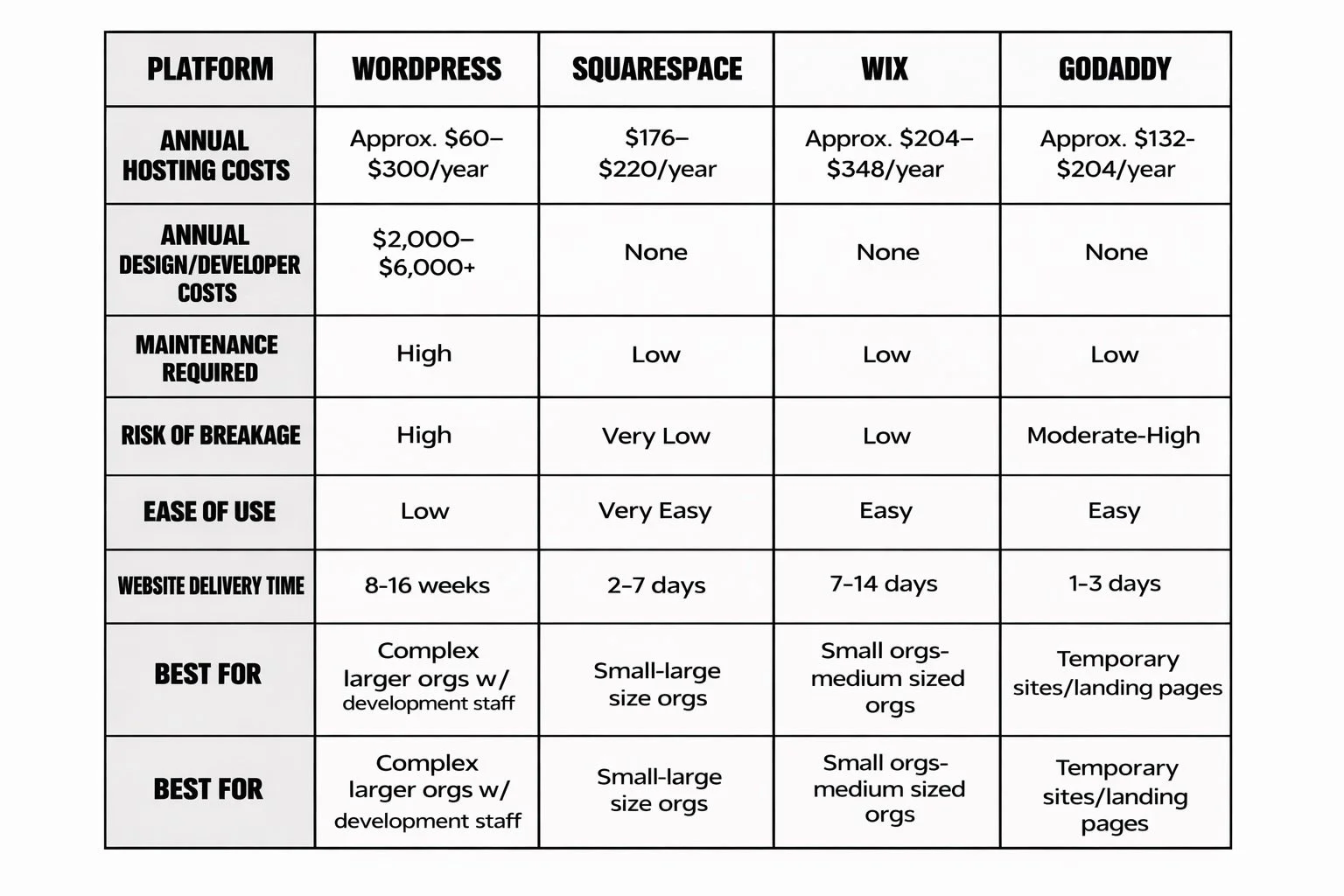
Here’s the honest comparison:
WordPress → Maximum flexibility, higher responsibility
Squarespace → Structured simplicity, lower maintenance
Wix → Flexible entry-level option, great for smaller teams
None are automatically right. None are automatically wrong.
The best nonprofit website builder is the one that aligns with:
Your internal capacity
Your growth goals
Your budget
Your technical comfort level
Your long-term sustainability
Strategy matters more than software.
But choosing software that matches your operational reality can protect your mission — or quietly strain it. Once you select which builder is best for your organization, make sure to read “What Should a Nonprofit Website Include?” to gain more insight on how to structure your nonprofit website.
